Mauro Pagano's Blog


2 Comments

Dynamic Sampling just got better

12c brought several new features in the SQL performance area and the most advertised one is probably Adaptive Query Optimization. The Adaptive Plans feature has been described in a lot of details (specially the adaptive join methods part) and most of the focus in Adaptive Statistics has been on SQL Plan Directives and Automatic Re-optimization, not much has been said about Dynamic Statistics, aka the new dynamic sampling (DS)
Since DS is also helpful outside of the whole Adaptive Query Optimization area so let’s just focus on it.

The original DS would kick in “by default” in absence of object statistics, increasing the level would make the CBO use it even under a few other conditions (details here).
Starting 11.2 (ER 7452863) DS can dynamically auto-adjust its own level at a query level (hence kicking in even when it would have not) when the SQL runs in parallel and large tables are involved.
Basically the old DS usually does a good job in helping the CBO get good estimations *for single tables*

  • in absence of stats
  • when the level is “high” (from 4 up)
  • when the SQL runs in parallel and tables are large

What just said implies DS doesn’t help much if

  • the table has stats but the level is default
  • the SQL runs in serial
  • we are estimating anything else but single table selectivity

The “new” dynamic sampling has been introduced in 12.1.0.1 and backported to 11.2.0.4 and it’s “hidden” behind the new level 11 or AUTO (value AUTO is accepted only in 12c) and it brings a lot of very interesting features

  • DS can kick in automatically when the CBO realizes it doesn’t have too solid estimations
  • DS can be applied on joins, group by and whole query blocks (haven’t looked too much yet into the query blocks one)
  • DS results can be cached using result cache and exported transparently using TCB

Let’s play a little with an example, test is from a 12.1.0.2.
Two tables with uniform data distribution and strong correlation across columns within the same table and between tables.

SQL> create table t1 as select mod(rownum, 50) n1, mod(rownum, 50) n2 from dual connect by rownum <= 1000;
SQL> create table t2 as select mod(rownum, 50) n1, mod(rownum, 50) n2 from dual connect by rownum <= 1000;
SQL> exec dbms_stats.gather_table_stats(user,'T1');
SQL> exec dbms_stats.gather_table_stats(user,'T2');

By default a join selectivity/cardinality would be underestimated since there is correlation but nothing to inform the CBO about it

SQL> select count(*) from t1,t2 where t1.n1 = t2.n1 and t1.n2 = t2.n2;

Plan hash value: 906334482

---------------------------------------------------------------
| Id  | Operation           | Name | Starts | E-Rows | A-Rows |
---------------------------------------------------------------
|   0 | SELECT STATEMENT    |      |      1 |        |      1 |
|   1 |  SORT AGGREGATE     |      |      1 |      1 |      1 |
|*  2 |   HASH JOIN         |      |      1 |   1000 |  20000 |  <---
|   3 |    TABLE ACCESS FULL| T1   |      1 |   1000 |   1000 |
|   4 |    TABLE ACCESS FULL| T2   |      1 |   1000 |   1000 |
---------------------------------------------------------------

Predicate Information (identified by operation id):
---------------------------------------------------
   2 - access("T1"."N1"="T2"."N1" AND "T1"."N2"="T2"."N2")

With such a simple join condition we can use a column group to fix the estimation and indeed it works fine

SQL>exec dbms_stats.gather_table_stats(user,'T1', method_opt => 'FOR COLUMNS (N1,N2) SIZE AUTO');
SQL>exec dbms_stats.gather_table_stats(user,'T2', method_opt => 'FOR COLUMNS (N1,N2) SIZE AUTO');

SQL> select count(*) from t1,t2 where t1.n1 = t2.n1 and t1.n2 = t2.n2;

---------------------------------------------------------------
| Id  | Operation           | Name | Starts | E-Rows | A-Rows |
---------------------------------------------------------------
|   0 | SELECT STATEMENT    |      |      1 |        |      1 |
|   1 |  SORT AGGREGATE     |      |      1 |      1 |      1 |
|*  2 |   HASH JOIN         |      |      1 |  20000 |  20000 |
|   3 |    TABLE ACCESS FULL| T1   |      1 |   1000 |   1000 |
|   4 |    TABLE ACCESS FULL| T2   |      1 |   1000 |   1000 |
---------------------------------------------------------------

Predicate Information (identified by operation id):
---------------------------------------------------
   2 - access("T1"."N1"="T2"."N1" AND "T1"."N2"="T2"."N2")

Anyway a column group can only be used with equality conditions (a column group is basically a hash of all the columns in the group) so as soon as we change our SQL then we are back on the understimated selectivity/cardinality

SQL> select count(*) from t1,t2 where t1.n1 = t2.n1 and t1.n2 > t2.n2;

---------------------------------------------------------------
| Id  | Operation           | Name | Starts | E-Rows | A-Rows |
---------------------------------------------------------------
|   0 | SELECT STATEMENT    |      |      1 |        |      1 |
|   1 |  SORT AGGREGATE     |      |      1 |      1 |      1 |
|*  2 |   HASH JOIN         |      |      1 |   9800 |      0 |
|   3 |    TABLE ACCESS FULL| T1   |      1 |   1000 |   1000 |
|   4 |    TABLE ACCESS FULL| T2   |      1 |   1000 |   1000 |
---------------------------------------------------------------

Predicate Information (identified by operation id):
---------------------------------------------------
   2 - access("T1"."N1"="T2"."N1")
       filter("T1"."N2">"T2"."N2")

So let’s turn on the new DS and check how it helps

alter session set optimizer_dynamic_sampling = 11;
select count(*) from t1,t2 where t1.n1 = t2.n1 and t1.n2 > t2.n2;

---------------------------------------------------------------
| Id  | Operation           | Name | Starts | E-Rows | A-Rows |
---------------------------------------------------------------
|   0 | SELECT STATEMENT    |      |      1 |        |      1 |
|   1 |  SORT AGGREGATE     |      |      1 |      1 |      1 |
|*  2 |   HASH JOIN         |      |      1 |      1 |      0 |
|   3 |    TABLE ACCESS FULL| T1   |      1 |   1000 |   1000 |
|   4 |    TABLE ACCESS FULL| T2   |      1 |   1000 |   1000 |
---------------------------------------------------------------

Predicate Information (identified by operation id):
---------------------------------------------------
   2 - access("T1"."N1"="T2"."N1")
       filter("T1"."N2">"T2"."N2")

Note
-----
   - dynamic statistics used: dynamic sampling (level=AUTO)

Notice how the join cardinality is now very accurate (and as a consequence we switched to HJ).
From the 10053 and 10046 (I wrapped around the 10046 to avoid a long scrollbar)

Join Card:  9800.000000 = outer (1000.000000) * inner (1000.000000) * sel (0.009800)
Join cardinality for HJ/SMJ (no post filters):  20000.000000, outer: 1000.000000, inner: 1000.000000, sel: 0.009800
>> Join Card adjusted from 9800.000000 to 1.000000 due to adaptive dynamic sampling, prelen=2
Adjusted Join Cards: adjRatio=0.000102 cardHjSmj=1.000000 cardHjSmjNPF=2.040816 cardNlj=1.000000 cardNSQ=1.000000 cardNSQ_na=9800.000000
Join Card - Rounded: 1 Computed: 1.000000


PARSING IN CURSOR #140546644531144 len=332 dep=1 uid=118 oct=3 lid=118 tim=173271358375 hv=1119371978 ad='c6e539a0' sqlid='f814kux1bhhqa'
SELECT /* DS_SVC */ /*+ dynamic_sampling(0) no_sql_tune no_monitoring optimizer_features_enable(default) no_parallel result_cache(snapshot=3600) */ 
SUM(C1) FROM (SELECT /*+ qb_name("innerQuery") NO_INDEX_FFS( "T1#1")  */ 1 AS C1 
FROM "T2" "T2#0", "T1" "T1#1" WHERE ("T1#1"."N1"="T2#0"."N1") AND ("T1#1"."N2">"T2#0"."N2")) innerQuery

Notice how the recursive DS SQL joins the two tables together, this wasn’t possible before.
At the same time we want to avoid triggering those SQLs over and over so the result is also cached

SELECT id, type, creation_timestamp, block_count, column_count, pin_count, row_count, name
  FROM V$RESULT_CACHE_OBJECTS
 WHERE cache_id = 'b1ytyjnksv3up3yjtn35bq96jx';  2    3  

	    ID TYPE       CREATION_ BLOCK_COUNT COLUMN_COUNT  PIN_COUNT  ROW_COUNT NAME
---------- ---------- --------- ----------- ------------ ---------- ---------- --------------------------------------------------------------------------------------------------------------------------------
	     4 Result     03-DEC-14 	      1	           1	      0	         1 SELECT /* DS_SVC */ /*+ cursor_sharing_exact dynamic_sampling(0) no_sql_tune no_monitoring optimizer_features_enable(default) re

The previous test shows how the new DS can help in more complex scenario (joins, group by, etc) than before but then at the same time it means more time could potentially be spent on DS. For this reason the recursive SQL gets a limited amount of time after which the execution aborts as well as a default cap for tables to join.
Those conditions as well as the result cache usage can be configured playing with the following parameters

NAME				            DESCRIPTION									         SESSION_VALUE
------------------------------- ---------------------------------------------------- --------------
_optimizer_ads_max_table_count	maximum number of tables in a join under ADS		 0
_optimizer_ads_time_limit	    maximum time limit (seconds) under ADS				 0
_optimizer_ads_use_result_cache use result cache for ADS queries					 TRUE

Adaptive Plans can help in avoid picking up an incorrect join method but the join order cannot be changed at runtime but getting a more accurate estimation at parse time could encourage a more efficient join order, that’s why I like the new DS so much.

IMHO this new feature has a lot of potential because it helps in addressing exactly those areas (joins, group by) where it’s particularly challenging for the CBO to get consistently accurate estimations.


1 Comment

Bye Oracle…

Not a technical post this time, just a heads up on some changes…

Today is my last day with Oracle after almost 10 years.
The journey started in Italy as part of Oracle Consulting back in 2005 and it ended today in the US as Support engineer.
During this time I met a lot of great people and I really hope I did some good (not up to me to say though 😉
All the tools I inherited from Carlos Sierra (SQLT, SQLHC, Trace Analyzer, etc etc) will be maintained by Abel Macias, a good friend of mine and one of the people who contributed so much in making SQLT the great tool it is today.

Tomorrow I’ll be joining the Enkitec family, I’m very excited about working with so many great people and I look forward to the challenges this new job will bring!


1 Comment

Testcases for SQL Tuning, build a hypothesis… and test it!

Most of the overall database performance issues (not caused by SQL tuning) are pretty complex to setup because they require a workload and it takes quite some work to reproduce concurrency in a test environment where at best you got a couple folks testing some new code. Nowadays there are ways to reproduce a realistic workload (ie. Real Application Testing) but still it’s not a 2 minutes deal.

One of the reasons why I like SQL Tuning so much is the ability to easily (dis)prove my hypotheses and so being able to gain a little more confidence on the root cause and how to fix the problem, the famous “I tested it!”.
First, how can you test (/reproduce) sql tuning problems? Building a testcase
Second, can SQLT make it easier for me? Of course, otherwise I would not be writing this post 😀

Regardless where your SQL runs, the optimizer will work the same.
I think of the optimizer as a deterministic mathematical model where given the same inputs (SQL, binds, stats, etc etc) I will receive the same output (execution plan), so to get the same output we just need to provide the same input!!
In summary to build a testcase we “just” need to collect all those info the optimizer uses when trying to find an optimal plan for our SQL, problem is putting all the pieces together and packing them in some sort of portable way may require a lot of time if performed manually.

For every run of SQLT (no matter the method used) a testcase is packed together into a zip file and added to the main output file. The archive name is sqlt_sNNNNN_tc.zip and it contains everything we need

Screenshot from 2014-11-04 05:18:32

The list of files is long but several scripts are just utilities that come handy when playing with a testcase, the most important files from the list above are:

  1. sqlt_sNNNNN_metadata.sql -> the DDL for all the objects involved in the SQL including dependencies
  2. sqlt_sNNNNN_exp.dmp -> a dmp of the SQLT repository from the source system, it includes stats plus some info we might need when remapping columns
  3. sqlt_sNNNNN_system_stats.sql -> the system statistics, so the CBO thinks the hw on the target system matches the source
  4. sqlt_sNNNNN_set_cbo_env.sql -> the CBO environment from the source system
  5. q.sql -> the SQL including binds

So how do we install the testcase? Still sounds a lot of work looking at all those files!
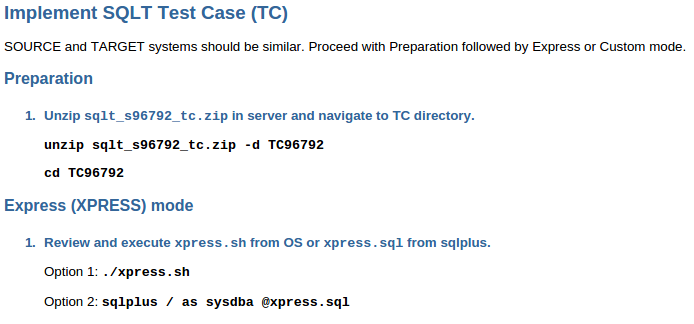
Inside the main zip file there is a html readme with all the instructions, follow “Implement SQLT Test Case (TC)”

Screenshot from 2014-11-04 05:31:32
Good news is SQLT provides a “hat” script (xpress.sql) that takes care of starting all the other scripts in the right order so from our point of view all it takes to install a testcase is unzip the file and start xpress.sql.

Screenshot from 2014-11-04 05:32:46

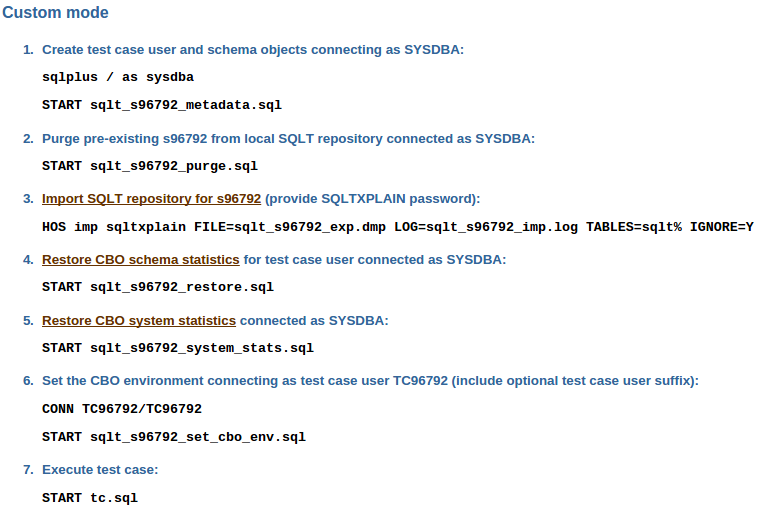
There is also a “custom” mode where you can manually start each script so that you have the flexibility to perform any other operation in between each step (ie. load some data)

Screenshot from 2014-11-04 05:34:36

It takes probably less than a couple minutes to install most of the testcases and once you have it in place it’s just a matter of proving your hypothesis right (or wrong) without having to touch the source system in any way.


Leave a comment

SQLT XPLORE mechanics

In the first post we looked at what XPLORE can do and how it can help identify the impact of CBO fixes/parameters but there was no reference to how the tool actually works so let’s try to fix that.

After installing XPLORE using sqlt/utl/xplore/install.sql we need to create our driver script using create_xplore_script.sql, at this point we are already connected as the target user (the installation connects us).
If we need a specific CBO environment now it’s the time to set all the parameters we need, right before starting create_xplore_script.sql.
Let’s keep it simple and assume the default configuration is enough (this holds true most of the times anyway).

Installation completed.
You are now connected as mpagano.

1. Set CBO env if needed
2. Execute @create_xplore_script.sql

SQL> @create_xplore_script.sql

Parameter 1:
XPLORE Method: XECUTE (default) or XPLAIN
"XECUTE" requires /* ^^unique_id */ token in SQL
"XPLAIN" uses "EXPLAIN PLAN FOR" command
Remember EXPLAIN PLAN FOR does not perform bind peeking
Enter "XPLORE Method" [XECUTE]: 

Parameter 2:
Include CBO Parameters: Y (default) or N
Enter "CBO Parameters" [Y]: 

Parameter 3:
Include Exadata Parameters: Y (default) or N
Enter "EXADATA Parameters" [Y]: 

Parameter 4:
Include Fix Control: Y (default) or N
Enter "Fix Control" [Y]: 

Parameter 5:
Generate SQL Monitor Reports: N (default) or Y
Only applicable when XPLORE Method is XECUTE
Enter "SQL Monitor" [N]: 


Review and execute @xplore_script_1.sql

Depending on the values we select at this stage then XPLORE will either execute (XECUTE) or gather an EXPLAIN PLAN FOR (XPLAIN) our SQL, for all the CBO and Exadata parameters and Fix Controls, collecting SQL Monitor reports.

The create script first captures the current CBO environment to use it as baseline and then creates the instructions for each test that will be executed.
Each test looks like

CONN ^^connected_user./^^user_password.^^connect_identifier.
EXEC xplore.set_baseline(1);
ALTER SESSION SET "_fix_control" = '8274946:0';
ALTER SESSION SET STATISTICS_LEVEL = ALL;
DEF unique_id = "xplore_{001}_[^^run_id.]_(00753)"
@^^script_with_sql.
WHENEVER SQLERROR CONTINUE;
ALTER SESSION SET "_fix_control" = '8274946:1';
EXEC xplore.snapshot_plan('xplore_{001}_[^^run_id.]_(00753)', 'XECUTE', 'N');

The first instruction reconnects to make sure we “start fresh” each time.
Then we set the CBO environment to our baseline and set statistics_level =’ALL’ to capture execution statistics.
At this point we can make the change we want to test, in the example above is to turn off the fix for bug 8274946.
Next step is to run our SQL (the unique identifier makes the SQL parsed and helps in identifying the cursor) and once the execution completes then XPLORE captures statistics about the current test from V$SQL, V$SQL_PLAN and V$SQL_PLAN_STATISTICS_ALL storing them into the XPLORE repository tables (tables stored in the target user schema).

In summary SQLT XPLORE iterates over each single CBO/Exadata parameters/Fix Control, changes its value (for some parameters we have several values to test) and capture statistics for the plan generated with such change in place.

After all the tests have been performed XPLORE generates a HTML report with several aggregations starting with a very aggregated overview of the results to then drill little by little up to the final plan with execution statistics for each single test


4 Comments

“When the going gets tough, the tough get going” aka SQLT XPLORE

When upgrading a database sometime you find that one or more SQLs run slower because of a new and suboptimal execution plan. Usually the number of those SQLs is pretty small compared to the overall workload but it’s not straightforward to understand what caused the plan change so even a small number can become tricky to track down.
Each optimizer fix as well as any new feature could be responsible for the plan change but every patchset introduces quite a lot of fixes/features (just check V$SYSTEM_FIX_CONTROL to get an idea) so how can we find out which specific fix is responsible for our performance regression?

The first good news is that CBO fixes are (usually) tied to the OPTIMIZER_FEATURES_ENABLE (OFE) parameter so we can quickly set this param back to the version of the database we upgraded from and check if the SQL returns to the old good performance.
Assuming the answer is yes then the second good news is SQLT provides a way to evaluate each fix_control and CBO parameter, SQLT XPLORE.

XPLORE is an independent module of SQLT that is available under sqlt/utl/xplore, it does require a very small installation (details in the readme.txt) and can be easily removed after our run is complete.
Let’s play a little with XPLORE to better understand its potential and application.

I have a SQL that regressed in performance after a 11.2.0.3 -> 11.2.0.4 upgrade, the SQL is

select count(*)
  from t1, t2, t3
 where t1.id = t2.id
   and t3.store_id = t2.store_id
   and lower(t1.name) like :b1
   and t1.country=:b2
   and t3.store_id = :b3
   and t1.flag=:b4

and the execution plan after the upgrade (right after parse so no possibility bind peeking is trickying us) is

Plan hash value: 1584518234

--------------------------------------------------------------------------------
| Id  | Operation                          | Name         | Rows  | Cost (%CPU)|
--------------------------------------------------------------------------------
|   0 | SELECT STATEMENT                   |              |       |   395 (100)|
|   1 |  SORT AGGREGATE                    |              |     1 |            |
|   2 |   NESTED LOOPS                     |              |     1 |   395  (11)|
|   3 |    NESTED LOOPS                    |              |  6702 |   395  (11)|
|   4 |     TABLE ACCESS BY INDEX ROWID    | T2           |     1 |     2   (0)|
|*  5 |      INDEX RANGE SCAN              | T2_STORE_IDX |     1 |     1   (0)|
|   6 |     BITMAP CONVERSION TO ROWIDS    |              |       |            |
|   7 |      BITMAP AND                    |              |       |            |
|   8 |       BITMAP CONVERSION FROM ROWIDS|              |       |            |
|*  9 |        INDEX RANGE SCAN            | T1_ID_IDX    |  6702 |    18   (6)|
|  10 |       BITMAP CONVERSION FROM ROWIDS|              |       |            |
|  11 |        SORT ORDER BY               |              |       |            |
|* 12 |         INDEX RANGE SCAN           | T1_FLAG_IDX  |  6702 |   103   (6)|
|* 13 |    TABLE ACCESS BY INDEX ROWID     | T1           |     1 |   395  (11)|
--------------------------------------------------------------------------------

Predicate Information (identified by operation id):
---------------------------------------------------
   5 - access("T2"."STORE_ID"=:B3)
   9 - access("T1"."ID"="T2"."ID")
  12 - access("T1"."FLAG"=:B4)
       filter("T1"."FLAG"=:B4)
  13 - filter((LOWER("T1"."NAME") LIKE :B1 AND "T1"."COUNTRY"=:B2))

Note T3 is removed by Join Elimination transformation
The plan cost is pretty small because the estimation for step 12 is very off and the real number of rows returned on such step is over 90% of the data, making the performance drop significantly.
Setting OFE back to 11.2.0.3 then the old good plan is generated

Plan hash value: 2709605153

----------------------------------------------------------------------------
| Id  | Operation                      | Name         | Rows  | Cost (%CPU)|
----------------------------------------------------------------------------
|   0 | SELECT STATEMENT               |              |       |  2007 (100)|
|   1 |  SORT AGGREGATE                |              |     1 |            |
|   2 |   NESTED LOOPS                 |              |   354 |  2007   (2)|
|   3 |    NESTED LOOPS                |              |  6702 |  2007   (2)|
|   4 |     TABLE ACCESS BY INDEX ROWID| T2           |     1 |     2   (0)|
|*  5 |      INDEX RANGE SCAN          | T2_STORE_IDX |     1 |     1   (0)|
|*  6 |     INDEX RANGE SCAN           | T1_ID_IDX    |  6702 |    18   (6)|
|*  7 |    TABLE ACCESS BY INDEX ROWID | T1           |   332 |  2005   (2)|
----------------------------------------------------------------------------

Predicate Information (identified by operation id):
---------------------------------------------------
   5 - access("T2"."STORE_ID"=:B3)
   6 - access("T1"."ID"="T2"."ID")
   7 - filter((LOWER("T1"."NAME") LIKE :B1 AND "T1"."COUNTRY"=:B2 AND
      "T1"."FLAG"=:B4))

Here the cost is more realistic and the CBO stayed away from T1_FLAG_IDX so the final performance is much better

We have one of those cases where after an upgrade the SQL runs slow and setting OFE back to the previous version reverts the old good plan, let’s see how XPLORE is going to help us find out what changed my plan.

In my specific case I reproduced both plans in a test environment where I have no data (took 3 mins to reproduce thanks to a SQLT TC 😉 so even the poor plan will not take more than a few milliseconds to run, just the parse time.

To install XPLORE all we need to do is connect as SYS, run install.sql and provide the username/pwd of the user we want to run XPLORE from. In case our system runs with a non default CBO environment and we need it to replicate the plans then we will be asked to set the proper environment too so that XPLORE can define a baseline CBO environment.
At the end of the installation a file called xplore_script_1.sql is generated, that’s our XPLORE driver script.

Next step is to run XPLORE so let’s connect as our application user and start xplore_script_1.sql
Input parameters are the name of the script for our SQL (remember the mandatory /* ^^unique_id */ comment!!!) and the password for our application user.

SQL> @xplore_script_1.sql

CONNECTED_USER
------------------------------
TC84168

Parameter 1:
Name of SCRIPT file that contains SQL to be xplored (required)
Note: SCRIPT must contain comment /* ^^unique_id */

Enter value for 1: myq.sql

Parameter 2:
Password for TC84168 (required)

Enter value for 2:

At this point XPLORE will test all the fix_controls and CBO parameters generating an execution plan for each of them (for some parameters, ie. optimizer_index_cost_adj we test several values), packing the result in a HTML report.

Let’s navigate the result

1

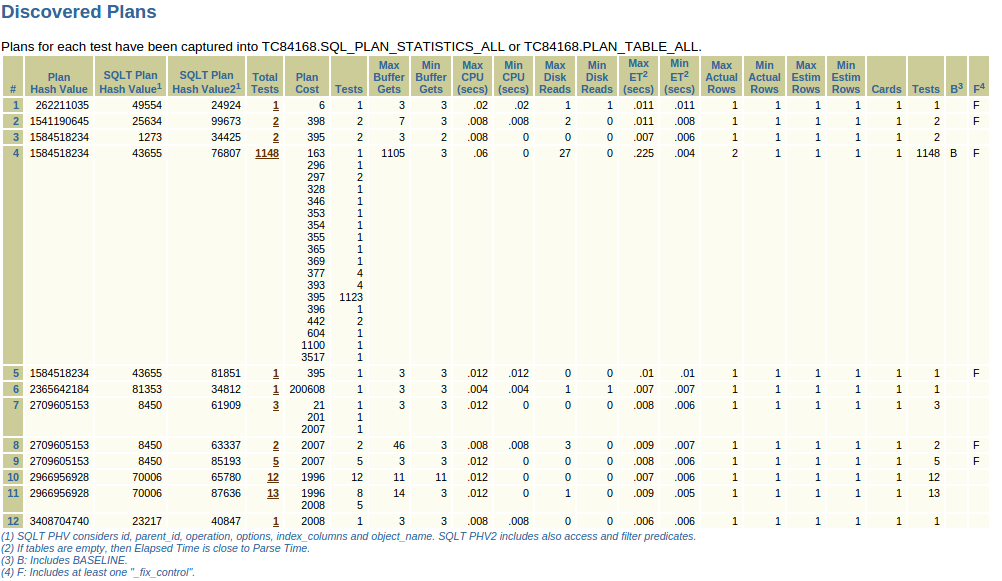
The section reports a list of all the PHVs identified, how many tests generated each plan as well as other useful information about those plans (some details later).
Looks like both are good (PHV 2709605153) and bad (PHV 1584518234) execution plans have been reproduced so let’s focus our attention on those two in the next section

2

We see that for our bad plan there are three lines, same PHV but different SQLT PHVs, that’s because those two additional PHVs are more restrictive and take into consideration additional factors (ie. filters) to better help differentiate between plans.
The plan in line #3 has been generated by 1148 tests including our baseline (‘B’) “execution zero” that is with no parameter/fix_control change. It’s not surprising to have so many tests generating the same plan as the baseline because most of the fixes/params usually don’t affect each and every SQL.

Our target plan is the one reported at lines #7,8,9 so let’s navigate to them

3

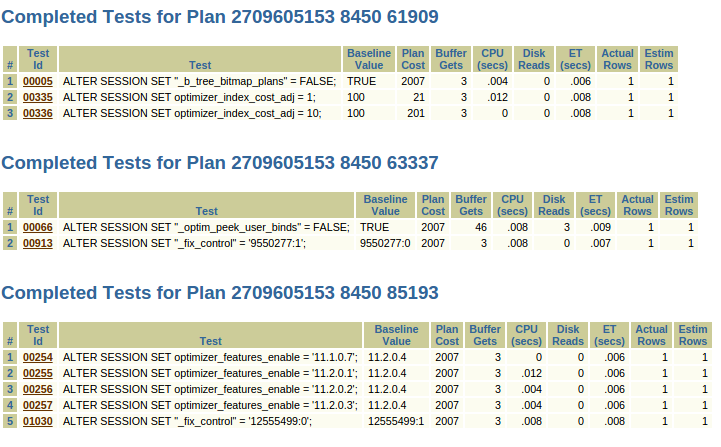
That’s the list of all the parameters and fix_controls that can lead to our good plan so we just need to go back to MOS and get some more information about those fixes to decide which one we want to test.
In this case the answer is 12555499 because it generates the same identical plan as OFE=11.2.0.3.

It’s usually better to use a fix_control rather than a parameter since the former is more likely to have a narrower scope than the latter.

SQL> alter session set "_fix_control"='12555499:0';
Session altered.

SQL> @myq
PL/SQL procedure successfully completed.

  COUNT(*)
----------
	 0

Plan hash value: 2709605153

----------------------------------------------------------------------------
| Id  | Operation                      | Name         | Rows  | Cost (%CPU)|
----------------------------------------------------------------------------
|   0 | SELECT STATEMENT               |              |       |  2007 (100)|
|   1 |  SORT AGGREGATE                |              |     1 |            |
|   2 |   NESTED LOOPS                 |              |   354 |  2007   (2)|
|   3 |    NESTED LOOPS                |              |  6702 |  2007   (2)|
|   4 |     TABLE ACCESS BY INDEX ROWID| T2           |     1 |     2   (0)|
|*  5 |      INDEX RANGE SCAN          | T2_STORE_IDX |     1 |     1   (0)|
|*  6 |     INDEX RANGE SCAN           | T1_ID_IDX    |  6702 |    18   (6)|
|*  7 |    TABLE ACCESS BY INDEX ROWID | T1           |   332 |  2005   (2)|
----------------------------------------------------------------------------

Predicate Information (identified by operation id):
---------------------------------------------------

   5 - access("T2"."STORE_ID"=:B3)
   6 - access("T1"."ID"="T2"."ID")
   7 - filter((LOWER("T1"."NAME") LIKE :B1 AND "T1"."COUNTRY"=:B2 AND
	      "T1"."FLAG"=:B4))

So using SQLT XPLORE we found in a few minutes which fix changed our execution plan, a workaround with a very narrow scope and also a way to research in MOS if any known issue related to this specific fix has been reported.

SQLT XPLORE can be used to troubleshoot other types of issues too, ie the report shows Min/Max Elapsed Time (ET) per plan as well as the ET per test, in case of no-data testcase then all the time will be parse time so we can use XPLORE to troubleshoot slow-parse issues and find which feature is accounting for most of the time and what to set to reduce such parse time


3 Comments

As a first post…a bookmark for the tools on My Oracle Support

When talking about troubleshooting Oracle issues I sometime find myself in conversations like “I’ve this problem ABC and I’m trying to understand what’s happening” so at that point I jump in and ask “why didn’t you use [tool XYZ|script 123|etc] ?”… well the answer is usually “I didn’t even know it existed, where can I find it? why is it not advertised anywhere?”

That’s why for my first post I decided to make a list of the tools available on MOS that I usually use and where to find them.
They are all free to download and use, you just need a valid MOS account

SQLTXPLAIN (SQLT) – *THE* tool when it comes to SQL Tuning… and not only
SQLHC – A reduced version of SQLT focused on Health-Checks… and more
MVHC – A set of Health-Checks focused on the good health of your Mviews
PXHC – A set of Health-Checks focused on the Parallel Execution setup/configuraton
VERSION_RPT – A script to collect and format info from V$SQL_SHARED_CURSOR
PROCWATCHER – A tool to monitor and examine Oracle and Clusterware processes at an interval

There are some other great tools I have in my swiss-knife directory that are not coming from MOS like EDB360 and Snapper.
I suggest you google them and make sure to have them ready!